Case study 02 · System replacement / SharePoint implementation
SharePoint implementation: one source of truth for a live operations room
For a New Zealand government transport agency, I designed the SharePoint navigation, templates and permissions, then migrated about 300 to 350 pages with SME sign-off. It went live a week before the deadline.
At a glance
- Role
- Business Analyst (SharePoint and Microsoft 365), engaged through an IT consultancy
- Client
- New Zealand government transport agency
- Platform
- SharePoint, the first step in the agency's move to Microsoft 365
- Scope
- Operations information for two major cities
- Duration
- Under two months, time-boxed
- Delivered
- Live a week before the deadline, ahead of the Christmas shutdown
- Content migrated
- About 300 to 350 pages
- Worked with
- Two client SMEs, operations room operators, senior stakeholders, project managers, a senior SharePoint consultant
- Tools
- SharePoint, Excel, Microsoft Teams
The problem
Operators in a live operations room needed fast, accurate information, but it was spread across sources that disagreed with each other.
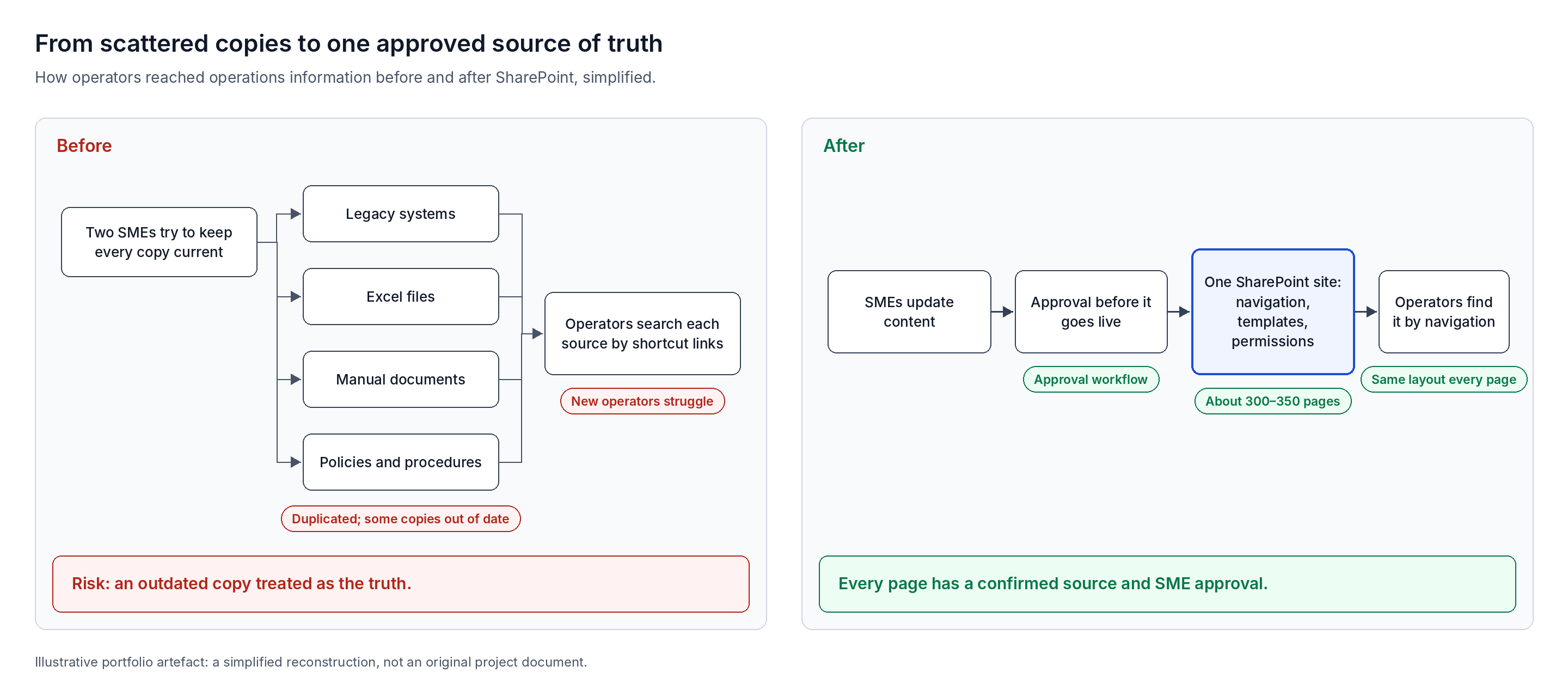
The agency's operations information sat across legacy systems, Excel files and manual documents, including policies and procedures. The same information was duplicated in several places. Some copies were current; others were well behind.
- Manual searching. Operators used shortcut links to legacy systems and directories to find a procedure while events were unfolding live.
- Hard for new operators. Experienced operators knew where to look; newer ones found it hard to reach the right information.
- Too many copies to maintain. Two subject-matter experts owned the information, and keeping every source up to date was difficult.
- Risk of acting on old information. An operator could treat an outdated copy as the truth.
The agency chose SharePoint as its single source of truth, the first step in introducing Microsoft 365 across the organisation.
My role and contribution
I was brought in through the consultancy to handle data migration. Once on site, my scope grew to cover how the whole site was organised, built, governed and handed over.
| Area | My involvement |
|---|---|
| Data migration (original brief) | Led: planned, cleaned and migrated every page by hand |
| Operator and stakeholder interviews | Led |
| Navigation design | Designed and built; agreed with SMEs and senior stakeholders |
| Folders and categories | Set up with the SMEs |
| Page templates for each city | Designed, refined and taken through approval |
| Permissions and access | Set up |
| Approval workflows and notifications | Set up and tested |
| Migration plan, mapping sheet and register | Created and maintained |
| User and administration guides | Wrote them all |
| Training | Ran sessions for the SMEs and stakeholders |
| Overall SharePoint direction | A senior SharePoint consultant at the consultancy |
Project phases
Discovery
Worked with two SMEs; spoke to operators and senior stakeholders.
Information architecture
Navigation, folders and categories agreed.
Page templates
A template for each city, refined and approved.
Permissions and approvals
Access, approval workflows and notifications.
Migration and review
About 300 to 350 pages, each SME-approved.
Training and go-live
Guides and training; live a week early.
Discovery and stakeholder engagement
I worked directly with the people who owned the information and the people who relied on it.
- Two SMEs. They were my main points of contact and owned the information that operators used.
- Operators. I spoke to operations room operators directly to understand what would make information quicker to find. Their answers shaped the navigation.
- Senior stakeholders. I worked with senior stakeholders across the agency to agree how the site should look and work.
- Working rhythm. I met the SMEs in person on site and virtually through Microsoft Teams throughout the engagement.
Information architecture and navigation
I designed how information was organised on the site, starting from how operators look for it.
- Navigation. I decided what appears in the navigation, what stays a heading and what drops down with more detail.
- Folders and categories. I set up the folder structure and the categories content would sit under, working with the SMEs.
- Agreement first. The SMEs and senior stakeholders agreed the design before I built it.
- Building it myself. As I became familiar with SharePoint's site-building options, I took on building the navigation as well as designing it.
Page templates
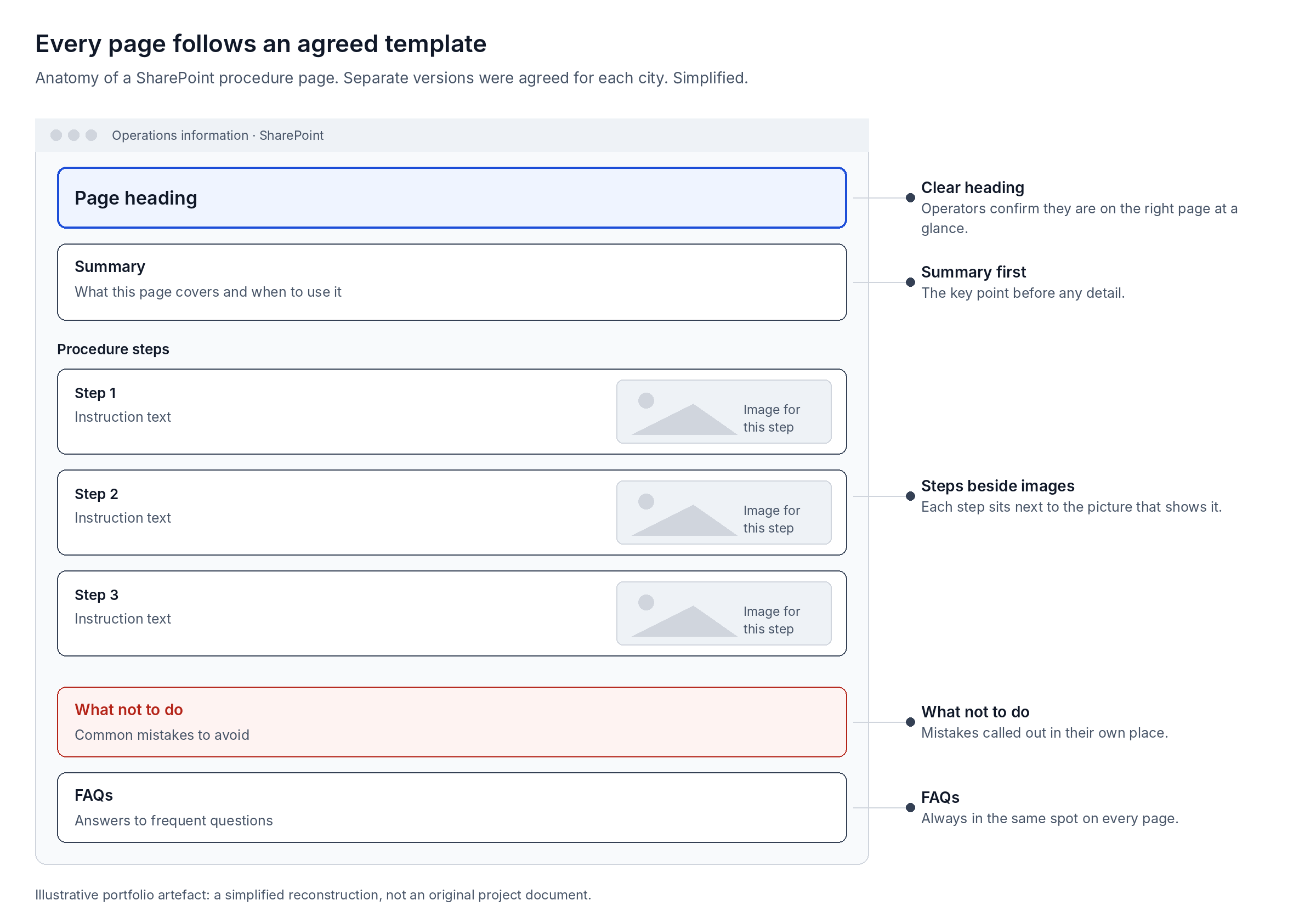
Every page follows an agreed template, so operators find the same kind of information in the same place every time.
- Consistent sections. Each page has a heading, a summary, procedure steps with an image beside each step, a what-not-to-do section and FAQs.
- A version for each city. The two cities had separate templates to suit their needs.
- Iterated to approval. Headings and layout went through several rounds of feedback before the templates were approved.
Permissions, approvals and notifications
- Access control. I set up user permissions and access for the site.
- Approval before publishing. New or changed content needs approval before it goes live.
- Notifications. Approvers are notified when content is waiting, and the right people are notified when someone requests access to a restricted page.
- Tested before go-live. I tested every approval workflow and notification for accuracy.
Data migration and quality control
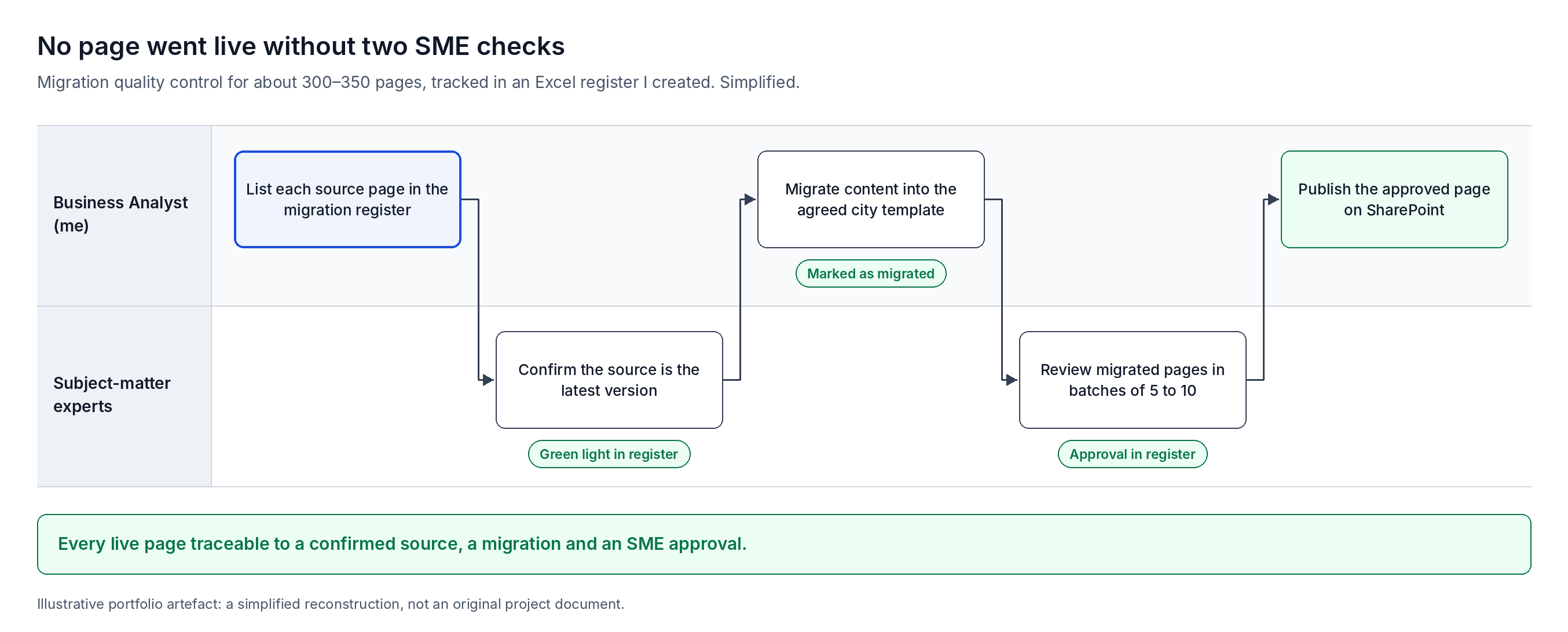
I migrated about 300 to 350 pages by hand, and created a review process so nothing outdated reached the live site.
Because each template combined text, images and set sections, content could not be bulk-copied. I cleaned every source and moved it into the right section of the right template myself, guided by a migration plan and mapping sheet.
- 1.Each page went into an Excel migration register I created, with a link to its source.
- 2.An SME confirmed the source was the latest version and gave it a green light.
- 3.I migrated the content into the template and marked it as migrated.
- 4.An SME reviewed the migrated pages in batches of 5 to 10 and approved each one as complete and accurate.
- 5.Only then did I publish the page.
The register made progress visible to everyone and kept outdated or incorrect information off SharePoint.
Training and handover
- Guides. I wrote the user and administration guides: finding information, editing and updating pages, managing permissions and handling approvals.
- Training. I ran sessions for the SMEs and stakeholders covering navigation, editing, permissions and where approval and access notifications arrive.
Outcomes
The site went live for both cities a week before the deadline, ahead of the Christmas shutdown.
- One place for operations information, instead of duplicated copies across legacy sources.
- Navigation designed around how operators actually search, rather than shortcuts to several systems.
- Every live page has a confirmed source and SME approval recorded in the register.
- SMEs can keep content current through approval workflows they were trained to use.
Challenges
- Agreeing the base templates. Getting every stakeholder to agree how the templates looked took many rounds.
- Complete and accessible pages. Each template had to be easy to read and include every piece of information its page needed.
- A growing scope in a fixed window. The work expanded well beyond migration within an engagement of under two months.
Lessons learned
- In a live operations environment, a single, current source of truth is critical. Outdated information can lead to wrong changes in operational systems.
- A simple register with SME sign-off at each step made a manual migration transparent and trustworthy.
Client details are anonymised. Diagrams are illustrative reconstructions created for this portfolio, not original project documents.