Case study 03 · Operational process improvement / resource and capacity planning
Resource and capacity planning: from asking around to one shared view
At a 330-person IT consultancy, I gathered requirements from practice leads and project managers, evaluated six tools, recommended ClickUp, and set up the dashboards and procedures that gave everyone one view of capacity.
At a glance
- Role
- Business Analyst, internal improvement project
- Organisation
- IT consulting firm, about 330 people, New Zealand
- Practices involved
- Digital, Microsoft 365, cybersecurity, project delivery and others
- Duration
- About 3 to 4 months, from interviews to rollout
- Tools evaluated
- Six; Resource Guru and ClickUp shortlisted; ClickUp selected
- Decision
- Head of Project Delivery, collectively with stakeholders, on my recommendation
- Worked with
- Practice leads, project managers, delivery leads, Head of Project Delivery
- Methods
- Stakeholder interviews, MoSCoW prioritisation, hands-on tool trials, user trial session, cost comparison
The problem
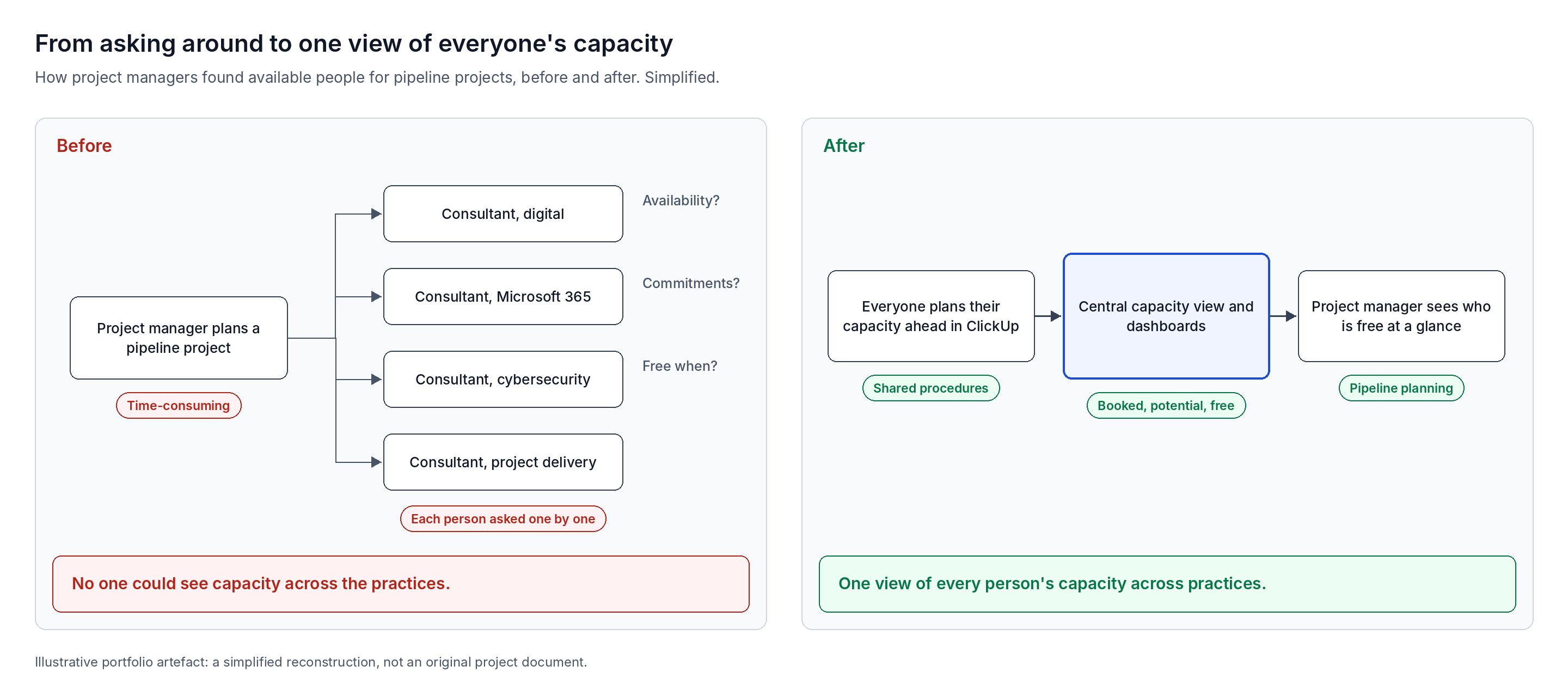
Project managers could not see who was free, so staffing a pipeline project meant contacting people one by one.
The consultancy worked across several practices, including digital, Microsoft 365, cybersecurity and project delivery, often in cross-functional teams. When a project in the pipeline looked likely to go ahead, its project manager had to plan who would work on it and when.
- No visibility. Nobody could see each person's capacity across the organisation.
- One-by-one checks. Project managers had to contact each person to ask about availability, existing commitments and when they would be free.
- Slow and frustrating. Every staffing decision started with a round of messages and waiting.
- Time blocked in calendars. People recorded commitments by blocking time in their Microsoft Teams calendars, which gave no shared view.
My role and contribution
I ran this internal project as the Business Analyst, from identifying stakeholders through to rollout and training.
| Area | My involvement |
|---|---|
| Stakeholder identification | Led |
| Interviews with practice leads and project managers | Led |
| Requirements and MoSCoW prioritisation | Led; validated with every stakeholder |
| Market research and hands-on tool trials | Led: six tools |
| User trial of the two finalists | Ran it |
| Recommendation and cost comparison | Presented to the major stakeholders |
| Final decision | Head of Project Delivery, collectively with stakeholders |
| Capacity planning procedures | Set up |
| Dashboards for every user | Built in ClickUp |
| Training | Ran sessions to help people get started |
Project phases
Stakeholder discovery
Identified and interviewed practice leads and project managers.
Requirements
Drafted, prioritised with MoSCoW and validated.
Market research
Six tools researched and trialled hands-on.
Shortlist and recommendation
User trial of two finalists; findings and costs presented.
Setup
Procedures and dashboards in ClickUp.
Rollout
Training sessions; adoption driven by practice leads.
Discovery and requirements
I started with the people who staffed projects, to understand exactly where resource planning broke down.
- 1.Identified the key stakeholders: practice leads and project managers, the people who needed to see capacity.
- 2.Interviewed them about their pain points with resource and capacity planning, which shaped the scope of the project.
- 3.Drafted the initial requirements from the interviews.
- 4.Refined them and validated them with every stakeholder before finalising.
- 5.Prioritised them with MoSCoW, so any tool had to meet the must-haves at a minimum.
The core requirement was a central view of every person's capacity, giving project managers the transparency they lacked.
Market research and tool evaluation
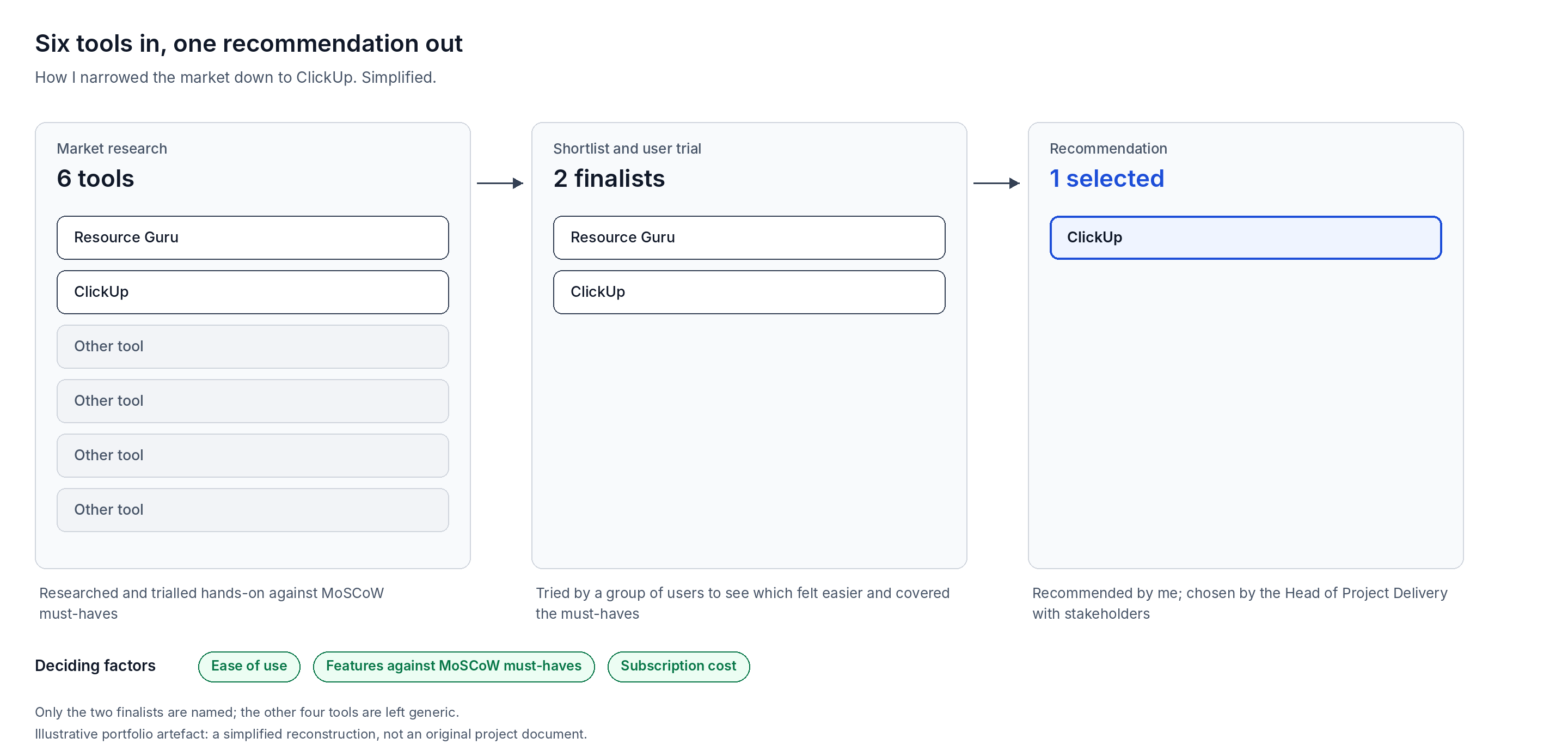
I evaluated six tools hands-on, narrowed them to two, and let real users try both before recommending one.
- Hands-on trials. I signed up for each tool and worked through its interface and features myself.
- Clear criteria. I compared ease of use, features against the MoSCoW must-haves, and subscription cost.
- A user trial. A group of people tried the two finalists, Resource Guru and ClickUp, to see which felt easier and covered the must-haves.
- Recommendation. I presented my analysis to the major stakeholders, covering the options, their costs, pros and cons, and my recommendation of ClickUp.
- Decision. The Head of Project Delivery made the final call, collectively with the stakeholders, and chose ClickUp.
Setup: procedures and dashboards
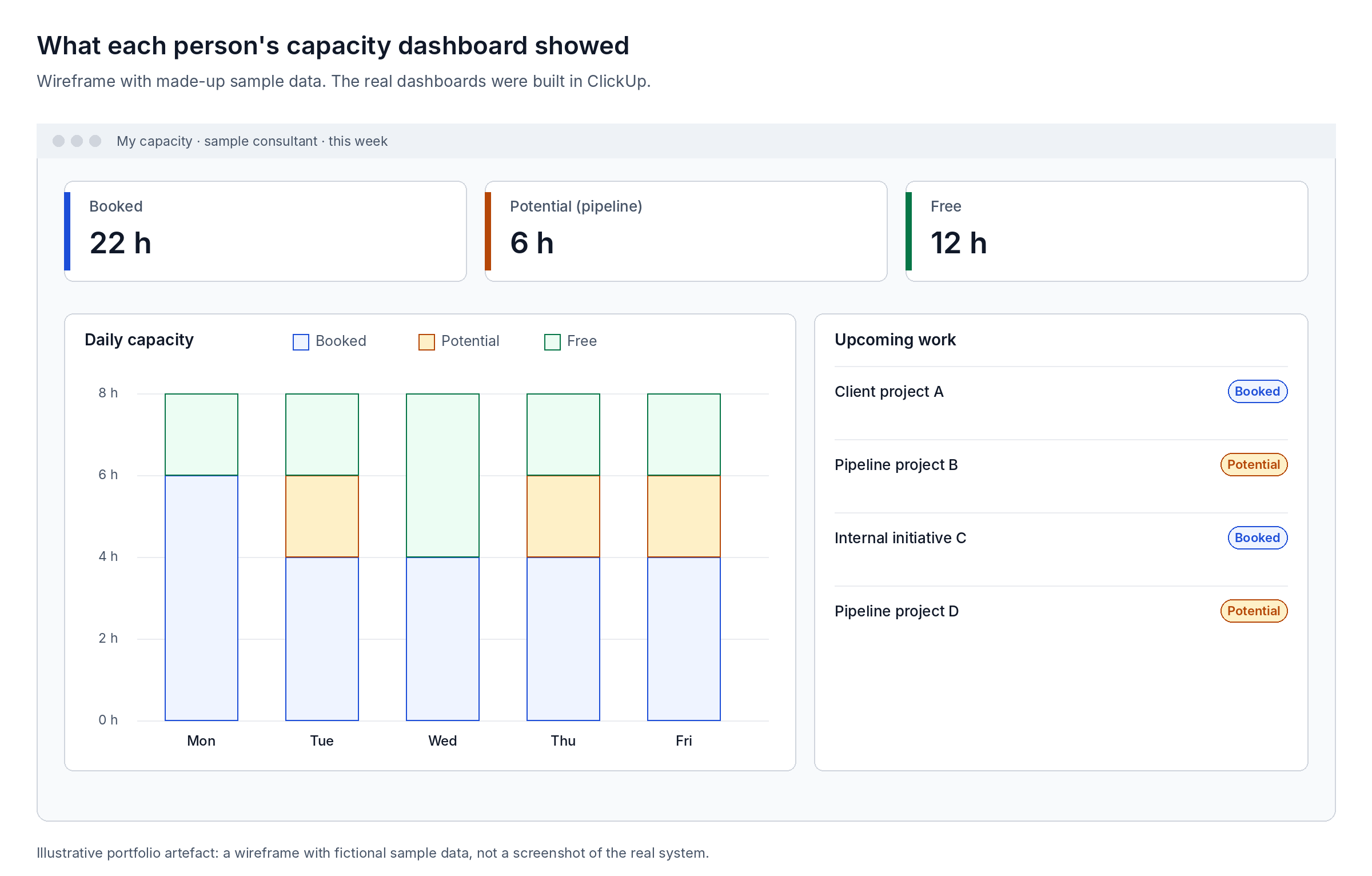
I set up the procedures and dashboards that turned ClickUp into a shared view of capacity.
- Procedures. Everyone records and plans their capacity in ClickUp in advance, so the right people can see it.
- Dashboards for every user. Each person can see their free time, upcoming pipeline, booked work, potential work and daily capacity.
- Pipeline planning. Project managers can plan capacity against projects in the pipeline.
- Internal capacity only. Client project management stayed in whichever tools each client used; ClickUp covered the consultancy's own capacity.
Rollout and adoption
Adoption started slowly, because updating capacity took time from people with full schedules.
- Training. I ran sessions to help people get started; the interface was simple enough that guides were not needed.
- Moving off calendars. People were used to blocking time in Microsoft Teams, so the transition meant building a new habit.
- Champions. Practice leads, project managers and delivery leads, who needed the capacity view most, actively promoted it and motivated their teams.
- Individual benefit. For team members, keeping capacity current meant a steadier flow of future work, which became a key motivation.
Outcomes
- A tool selected through a structured, evidence-based evaluation, with costs and trade-offs made visible to decision-makers.
- A central view of capacity across practices, replacing one-by-one checks for anyone using it.
- Dashboards giving every person a view of their booked, potential and free time.
- Adoption led by practice leads and project managers within their own teams.
Challenges
- Stakeholder availability. Practice leads and project managers were in back-to-back meetings, so scheduling interviews stretched the timeline to three to four months.
- Competing with billable work. In a consultancy, client work comes first, and I fitted this project around my own client commitments too.
- Slow early adoption. Updating capacity felt like extra effort at first, especially alongside existing calendar habits.
Lessons learned
- Remove double entry. If people already record time somewhere, connect the new tool to it or retire the old habit with a clear switch-over date, so there is only one place to update.
- Show each person what is in it for them. Team members carry most of the effort, so the personal benefit, such as a steadier flow of future work, has to be clear.
- Start with champions. Practice leads and project managers who need the outcome most are the best people to bring their teams on board.
- Balance stakeholder time against billable priorities. Book time early, but respect that client work comes first in a consultancy, and plan the timeline around it.
Organisation details are anonymised. Diagrams are illustrative reconstructions created for this portfolio, not original project documents.