Case study 04 · Master's capstone with a real client
A custom website for a support dog charity, delivered through a change of client
For my Master's capstone, I led the business analysis and project management for a team of five building a custom website for a Brisbane not-for-profit, and designed its database and analytics. When the client went quiet halfway through, we kept going and handed over a finished build.
At a glance
- Context
- Master's capstone project with a real client
- Client
- Brisbane not-for-profit that provides support dogs to eligible people
- Team
- Five students
- Duration
- Six months
- My role
- Business Analyst and project manager; designed and built the database and analytics
- Methods
- Discovery sessions, requirements validation, MoSCoW, user stories with acceptance criteria, Kanban, UAT
- Tools
- Zoom, Jira, Trello, Amazon DynamoDB, Google Analytics
- Delivered
- A finished, working build, handed over live to the course coordinator
The brief
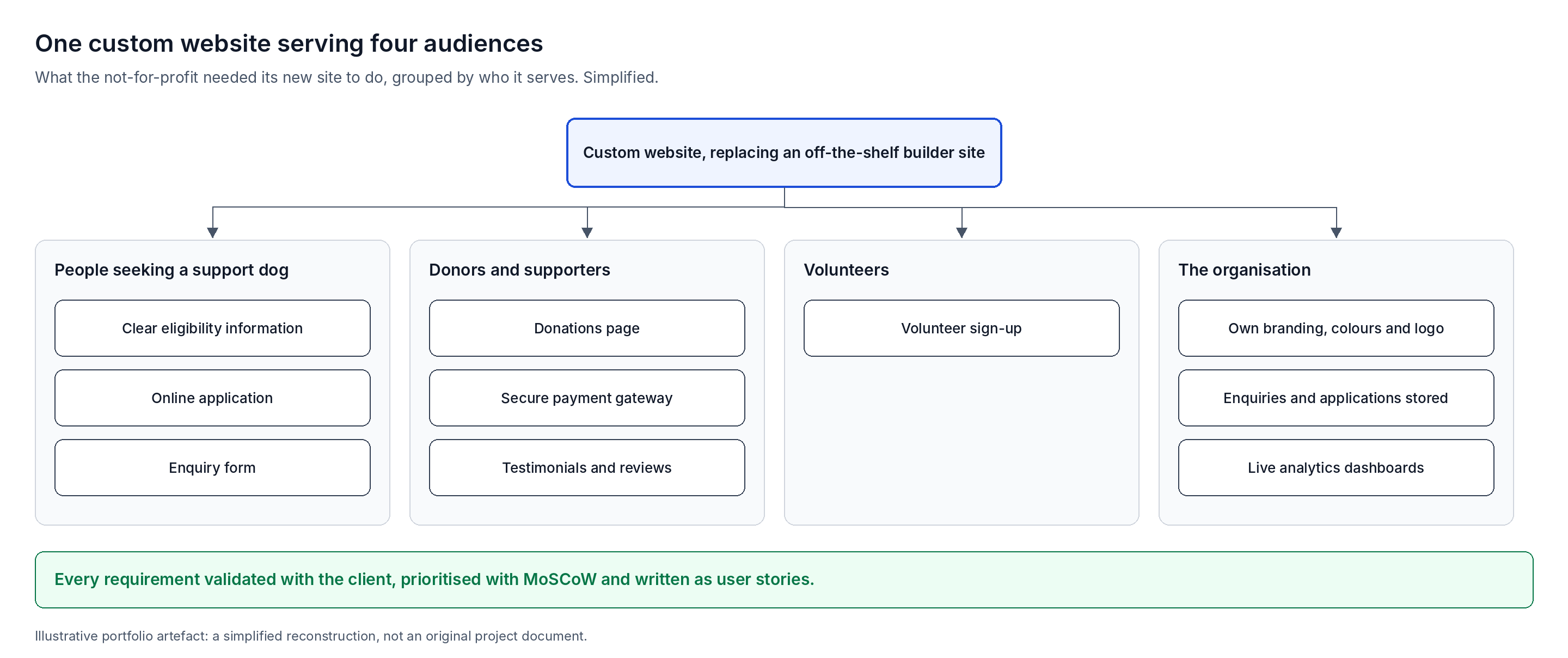
The charity's website came from an off-the-shelf builder, and it could not do what the organisation needed.
They wanted a proper custom site that reflected their brand and did real work for them: explaining eligibility, taking applications, attracting donations and recruiting volunteers.
- Their own identity. Custom colours and their logo, rather than a generic template.
- Eligibility and applications. Clear eligibility information and a way to apply or enquire online.
- Trust. Testimonials and reviews from people they had supported.
- Donations. A dedicated, secure payment gateway.
- Volunteers. A way for people to sign up to help.
My role and contribution
As a university project, the role was broader than a typical BA position. I ran the business analysis and project management, and built the data side of the site.
| Area | My involvement |
|---|---|
| Stakeholder sessions and discovery | Led |
| Requirements and client validation | Led |
| MoSCoW prioritisation | Led |
| User stories and acceptance criteria | Wrote them |
| Jira Kanban setup and tracking | Set up and ran it; moved every user story onto the board |
| Project management | Led |
| Database design (Amazon DynamoDB) | Designed and built |
| Website to database connection | Built and tested |
| Analytics dashboards (Google Analytics) | Built |
| Website build | Team effort |
| UAT | Whole team, including me |
Project phases
Discovery
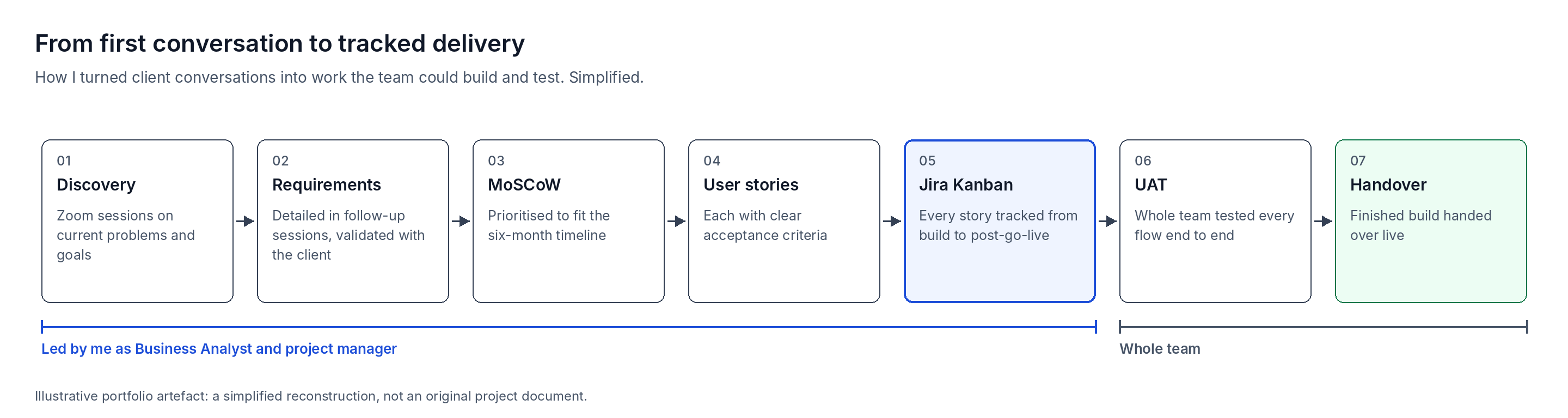
Zoom sessions on the client's problems and goals.
Requirements
Detailed, validated with the client, prioritised with MoSCoW.
Design and prototype
First three months, with the original client.
Change of client
Course coordinator stepped in after the summer break.
Build and data
Website, database, payments and analytics.
UAT and handover
Tested end to end; finished build handed over.
Discovery and requirements
I ran discovery with the client's stakeholders, then went back for the detail until the requirements were concrete enough to build.
- 1.Booked time with the stakeholders we were put in contact with, and met them over Zoom.
- 2.Ran a discovery conversation about their current problems and what they wanted to achieve.
- 3.Held follow-up meetings to draw out the detailed working requirements for the site.
- 4.Finalised the requirements and validated them back with the stakeholders.
- 5.Prioritised them with MoSCoW to confirm what the team could deliver in the time available.
User stories and acceptance criteria
I wrote each requirement as a user story with clear acceptance criteria, so the team knew exactly what to build and how it would be tested.
Example user story (illustrative)
As a person interested in a support dog, I want to check the eligibility criteria before I apply, so that I know whether to submit an application.
- Given I am on the eligibility page, when I read the criteria, then each criterion is listed in plain language.
- Given I meet the criteria, when I select apply, then I am taken to the application form.
- Given I submit a completed application, when it is received, then it is stored in the database and I see a confirmation.
This example is written in the style I used for the portfolio; it is not copied from the project records.
Delivery with Jira
- Kanban boards. I set up Jira Kanban boards and moved every user story onto them.
- End-to-end tracking. The boards tracked each story through build, deployment, implementation and post-go-live maintenance.
- Team collaboration. The team used Trello to coordinate day to day and to step in when someone needed help.
Database, integration and analytics
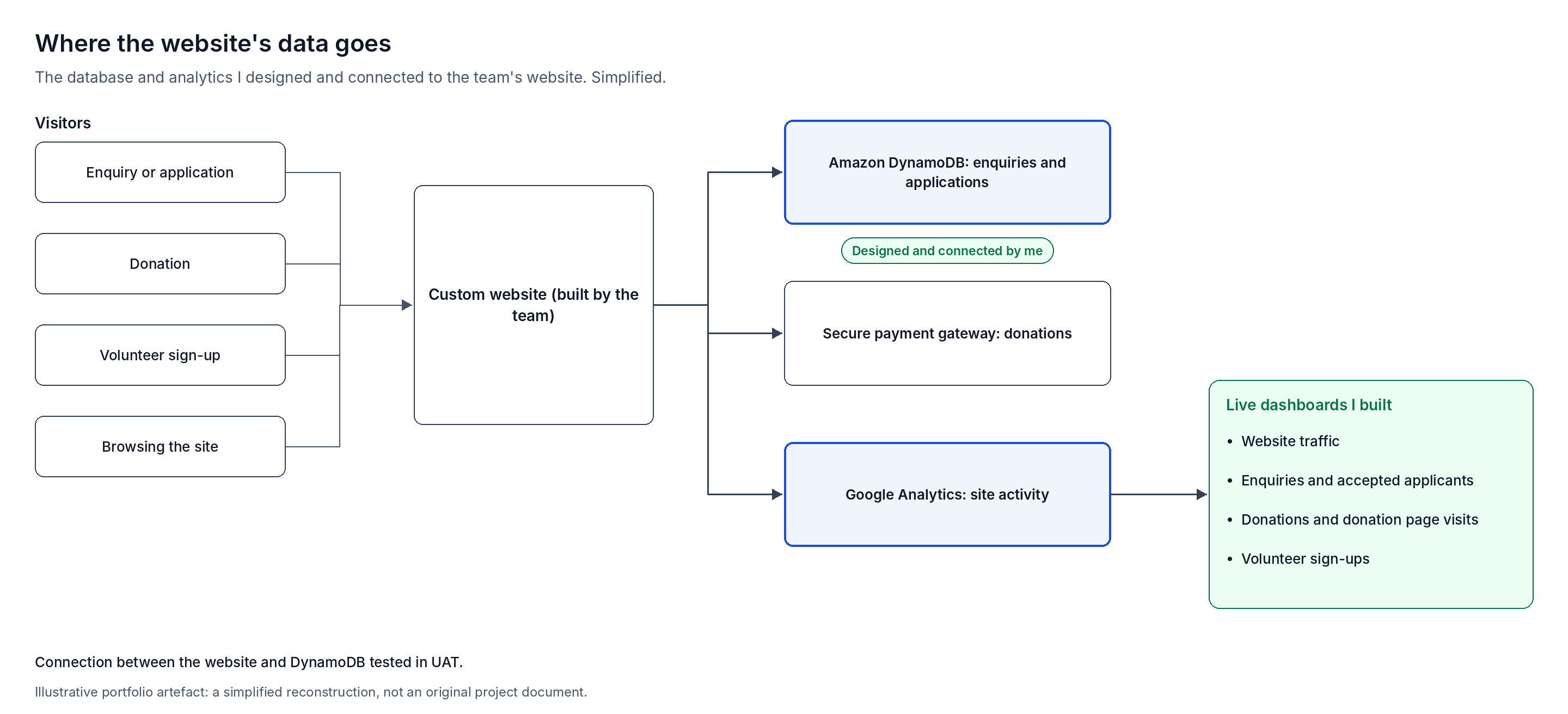
I designed the database behind the site, connected it to the website the team built, and set up analytics the charity could act on.
- Database. I designed an Amazon DynamoDB database to store enquiries, applications and the user data the website needed.
- Integration. I built the connection between the website and the database, and we confirmed it worked in UAT.
- Analytics. I built live dashboards in Google Analytics covering website traffic, enquiries, accepted applicants, donations, donation page visits and volunteer sign-ups.
- Purpose. The dashboards were designed to show the charity what was working, to guide promotion and fundraising.
Managing a client who went quiet
Three months in, after the design and prototype phase, the client stopped responding.
After the two-week summer break, our course coordinator stepped in as the client. He already knew the project's history, so we kept our momentum. He joined a weekly meeting to review the working site and our progress through build, implementation and handover.
Testing and handover
- Whole-team UAT. Every team member took part, testing each flow end to end, including submitting enquiries as a real user would.
- Integration checks. We confirmed the website to database connection worked during UAT.
- Handover. We handed over a finished, working build, live, to the course coordinator. Because the original client had stopped responding, the site did not go live for the charity itself.
Outcomes
- A finished custom website with the charity's branding, eligibility information, applications, testimonials and volunteer sign-up.
- A secure donations payment gateway, built and working in the final version.
- A DynamoDB database storing enquiries and applications, connected to the site and tested.
- Live analytics dashboards covering traffic, enquiries, applicants, donations and volunteers.
- A finished build delivered despite losing the original client halfway through.
Lessons learned
- Document requirements properly. Clear requirements, user stories and strong acceptance criteria keep the delivery cycle on track; anything left loose adds build time later and eats into budget and resources.
- Keep clients invested. Some things are outside anyone's control, but regular, well-paced updates at every step help a new client stay engaged without overwhelming them.
- Read the context. This project was free to the client, which made it easier for them to step away. When real money is involved, a quiet client more often means a pause than an end, so plan for the project to resume.
This was an academic capstone. The client is anonymised. Diagrams and the example user story are illustrative reconstructions created for this portfolio, not original project documents.